
Free · Open source · No ads
The iCal-style calendar for your Windows desktop
MonoCalendar brings the clean look of Apple’s iCal to Windows: colour-coded calendars, a clear week view and a mini-month navigator — in a download smaller than a photo.
- Windows
- Linux (Mono)
- 252 KB
- 20 languages
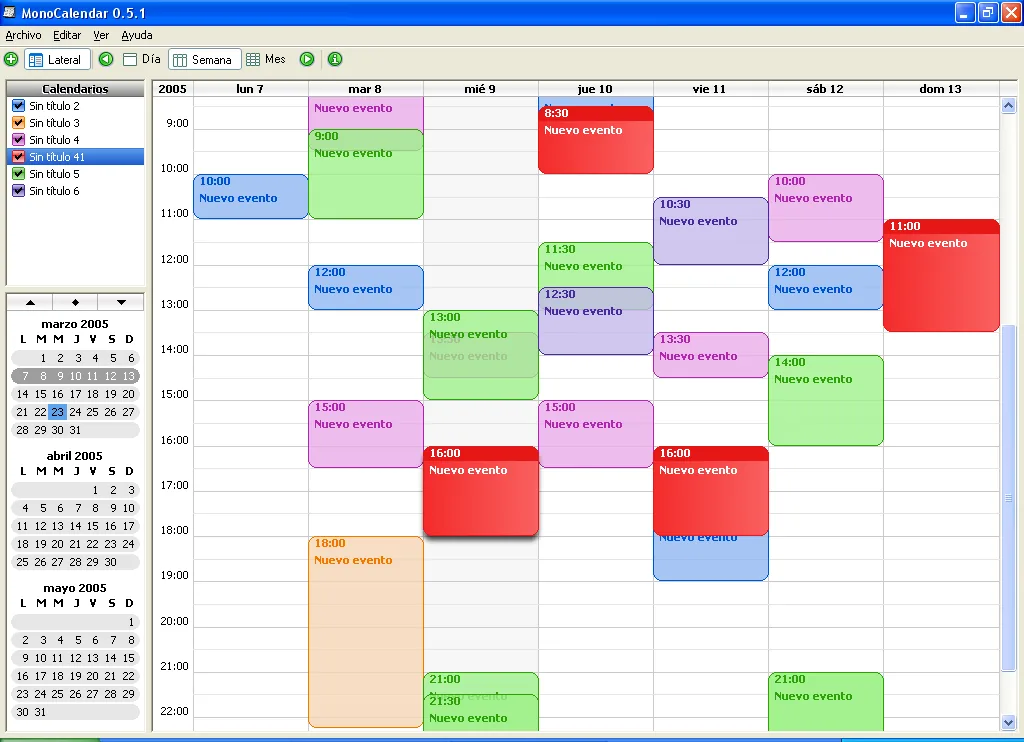
Everything you need to plan your week. Nothing you don’t.
A desktop calendar that opens instantly and stays out of your way.
Colour-coded calendars
Keep work, personal and everything else apart. Show or hide each calendar with a single click.
Day and week views
See your whole week at a glance, or zoom into a single day hour by hour.
Mini-month navigator
Jump to any date from the side panel, with several months always in view.
Tiny and fast
The installer is just 252 KB. It starts in a moment, even on old computers.
Free and open source
No price, no ads, no spyware, no sign-up. The source code is public.
Speaks your language
Translations into 20 languages, made by volunteers from around the world.
Why MonoCalendar exists
It started with a simple wish: ^Aurin^ (Rocío Movilla Iglesias) bought an iBook, fell in love with iCal and wanted the same calendar on Windows. Apple never made one — so MonoCalendar was born, and it is dedicated to her.
It is written in .NET, so the same program runs on Windows and, thanks to the Mono project, also on Linux. It doesn’t try to replace iCal: it is a free, lightweight alternative for everyone who can’t use it.
Frequently asked questions
MonoCalendar won’t start. What do I do?
Does it work on Windows 10 and Windows 11?
Is MonoCalendar really free?
Give your week some colour
Download MonoCalendar for free. It takes less than a minute.
Download for Windows — freeVersion 0.7.2 · 252 KB · No ads, no account